Understanding your analytics
What every chart and number on the dashboard means, and how to use Compare to spot which links work.
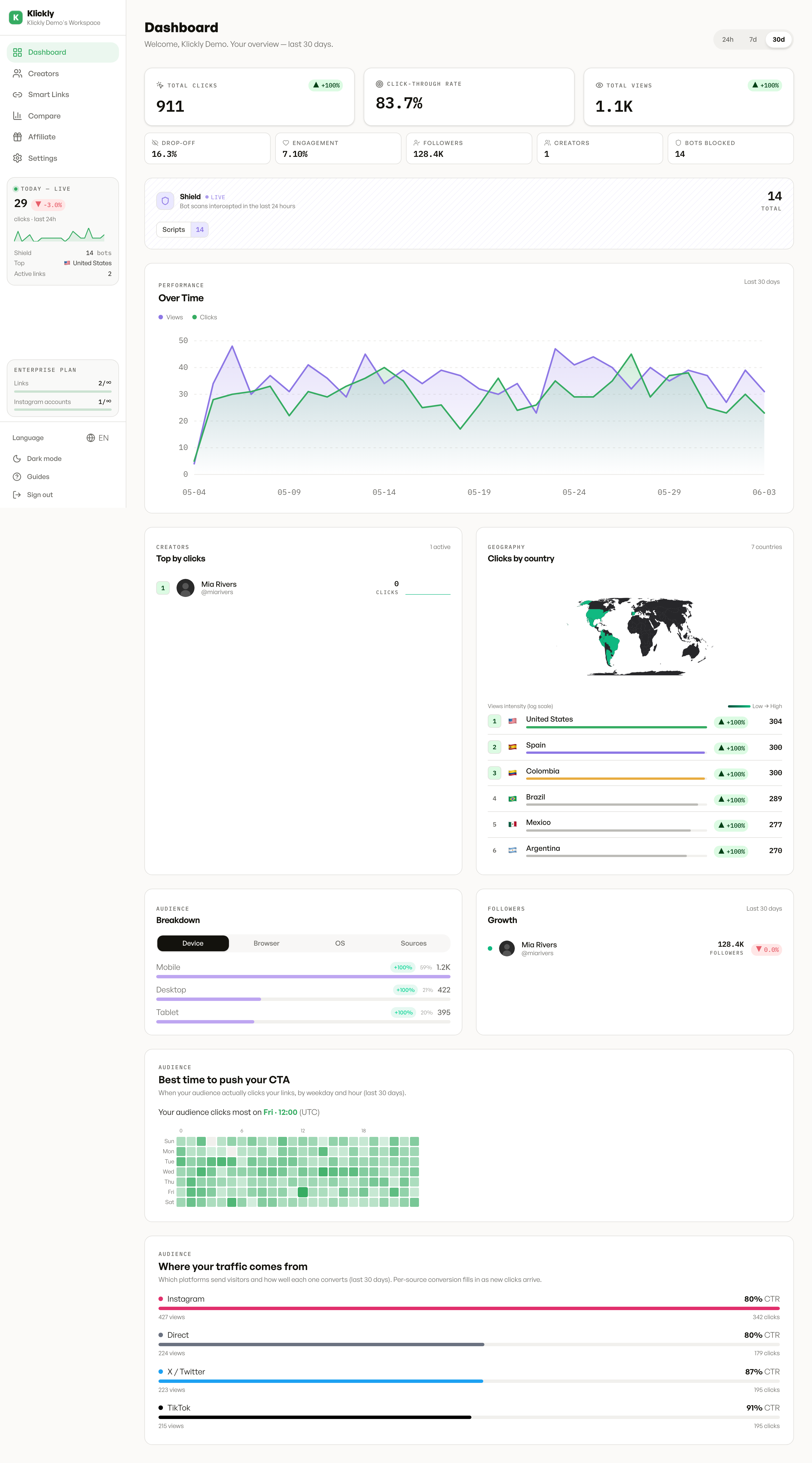
Klickly's analytics live in two places: the main Dashboard (overview of every link in your org) and the Compare view (side-by-side metrics across all your links). Every metric distinguishes humans from bots — bots come from the Shield system and are counted but kept separate so they never inflate your conversion stats.
- 1
Dashboard hero — the four KPI cards
Total clicks (in the selected window), total views (page loads), CTR (clicks ÷ views, capped at 100%), shield hits (bot scans Klickly blocked). Toggle the time window with the 24h / 7d / 30d buttons at the top right.
- 2
Audience tabs — where your visitors come from
Five tabs under the chart: Country, Device, Browser, OS, Sources. Each shows top hits in the window with absolute count and share-of-total %. Use Country to spot geographic concentration; use Sources to see which platform sends you traffic (instagram, tiktok, twitter, direct…).
- 3
Timeline chart — clicks per day
The line chart under the hero shows daily clicks for the selected window. Bot-filtered. Hover any point for the exact number on that day.
- 4
Compare view — side-by-side analytics
Sidebar → Compare. Table of every smart link in your org with sortable columns (clicks, views, CTR, unique visitors, bots %, shield hits, top country, top device, 7-day trend sparkline). Sort by clicks to find your top performers, or by CTR to find the ones with the best conversion. CSV export at the top right.
CTR > 100% is normal for multi-button landings
If you have a landing with 5 buttons, a single visitor can tap multiple — each tap fires a CLICK event but the VIEW fires only once. So raw events can push CTR over 100%. We cap it at 100% in the UI to keep the number meaningful, but if you ever wonder "how can my CTR be 80% when I only have one button?", it's because the visitor scroll-scrolled-tapped, scroll-tapped-scrolled etc.
Bots column on Compare shows 0% for most links
It's expected. Bots that hit your link get caught by Shield BEFORE they're recorded as Click rows, so they show up in shield_hits but not in bots %. The bots column is for the rare bots that slipped past Shield — a high % there means you've got a new crawler we haven't taught Shield about yet.